


|
Name |
AGC ToolKit Pro |
|---|---|
|
Google Play Link |
GET IT ON
Google Play
|
|
Category |
Tools |
|
Developer |
Mobile Filters & Watermark & Video Player |
| Last version | 7.6.17 |
|
Updated |
|
|
Compatible with |
Android 7.0+ |
Introduction to AGC ToolKit Pro APK
AGC ToolKit Pro is a mobile utility app designed for people who use Google Camera (GCam) and enjoy customizing their photography workflow. The app works as a companion tool that helps users manage camera configurations, apply visual presets, and organize useful GCam resources. It focuses on practical tools rather than camera capture itself, making it helpful for users who want better control over their photo editing setup.
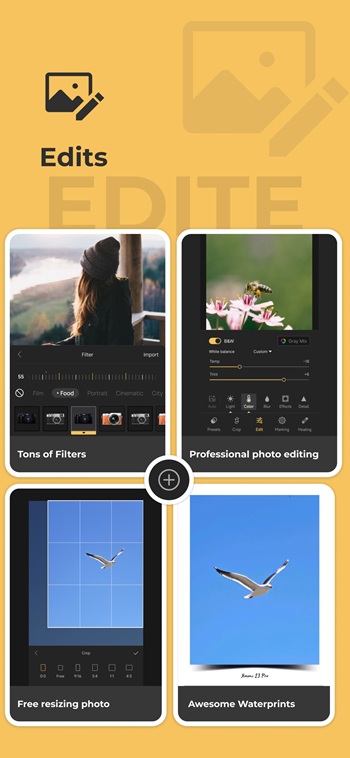
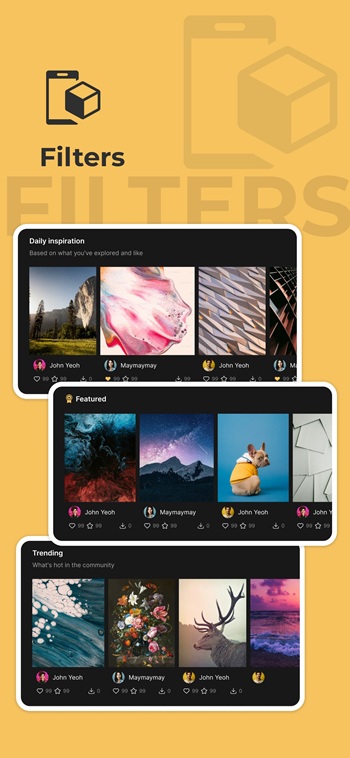
One of the main purposes of AGC ToolKit Pro is to manage LUT presets for photos. LUTs, or Look-Up Tables, adjust the color style of an image in a quick and consistent way. The app allows users to import, share, and apply these presets directly to photos stored on their device. This makes it easier to test different color styles without switching between multiple editing apps.
Another useful function is watermark support. Users can add custom watermarks to photos with simple controls. This feature is helpful for photographers, content creators, or anyone sharing images online who wants to add a signature, brand mark, or copyright notice. The process is straightforward and does not require advanced editing knowledge.
AGC ToolKit Pro also helps manage GCam configuration files. Many GCam users rely on custom configs to optimize image processing for specific devices. The app provides a convenient place to adjust, organize, and switch between these configuration setups. It also includes a bookmark viewer that lets users keep track of helpful GCam links or resources.
The biggest advantage of the app is convenience. Instead of jumping between several tools, users can handle presets, watermarks, and configuration management from one place. The interface is simple enough for casual users while still useful for photography enthusiasts who enjoy experimenting with image styles.
There are a few limitations to keep in mind. AGC ToolKit Pro does not function as a full photo editor and relies on GCam users to get the most value from it. Some features may feel unnecessary for people who only take basic photos without custom camera setups.
The app suits mobile photographers, GCam mod users, and content creators who like tweaking visual styles on their photos. It is especially useful for people who frequently test new camera configs, share LUT presets with friends, or want a quick way to apply consistent color looks before posting images online.
FAQs AGC ToolKit Pro
What is AGC ToolKit Pro used for?
+
AGC ToolKit Pro is a mobile utility app that helps GCam users manage configuration files, apply LUT color presets to photos, add watermarks, and organize helpful camera resources.
How does AGC ToolKit Pro apply LUT presets to photos?
+
The app allows users to import LUT files and apply them directly to images stored on their device. This quickly changes the color tone or style of a photo without complex editing steps.
Can AGC ToolKit Pro manage Google Camera configuration files?
+
Yes. The app includes tools for organizing and adjusting GCam configuration files, making it easier to switch between different camera setups optimized for specific devices.
Does AGC ToolKit Pro include photo watermark tools?
+
Yes. Users can add custom watermarks such as logos, names, or signatures to their photos before sharing them online.
Who should use AGC ToolKit Pro?
+
The app is most useful for GCam mod users, mobile photography enthusiasts, and creators who often test camera configurations or apply consistent color styles to their photos.
Discover More Interesting Apps
-

TXD Tool
v1.7.4
12.1 MB
Updated -
Flezen
v1.8.9
62.45 Mb
Updated -
Mod
GG Mouse Pro 3
v3.3.2
36.85 Mb
Updated -
Warden
v1.3.1
10.82 Mb
Updated -
Mod
MacroDroid
v6.1.5
87.36 Mb
Updated -
Mod
Ad Blocker
v7.6.18
39.00 Mb
Updated -
Miraa App
v1.15.2
80.68 Mb
Updated -
Mod
Kimi
v3.1.6
68.90 Mb
Updated -
Mod
SWAP - No ROOT
v5.0.1
22.63 Mb
Updated -
Mod
Touch VPN
v4.1.0
51.77 Mb
Updated










Share Your Thoughts